 docs/studio.ans · The sourcing studio
Cut fonts and stencils out of scene art, by hand or with Claude.
Opening the studio
The sourcing studio builds fonts and stencils from scene art, by hand or with Claude. Open it from the Gallery’s Studio tab, the sidebar’s studio button, or palette › Harvest fonts & stencils from art….
Every step is a button in the bar at the bottom, with its key on it.
1. Find art
The 16colo.rs browser fills itself: years, then packs. You can also type a URL, a zip, a file or a folder. Sources you’ve loaded come back as one-click chips.
2. Pick a logo
The studio shows the logos found in the source, with the artist’s credit. The side panel shows which of your fonts the letters would go into, and what that font has so far.
A single file, or a piece sent from the Gallery, skips this and opens straight in the cutter; Esc there comes back here.
3. Cut letters
The cutter shows the whole piece, free form. Select a letter any way you like, then type the letter it is:
- lasso (L): draw around it; a click takes the shape under it.
- paint (P): brush over its cells.
- wand (W): click its shape.
- box (B).
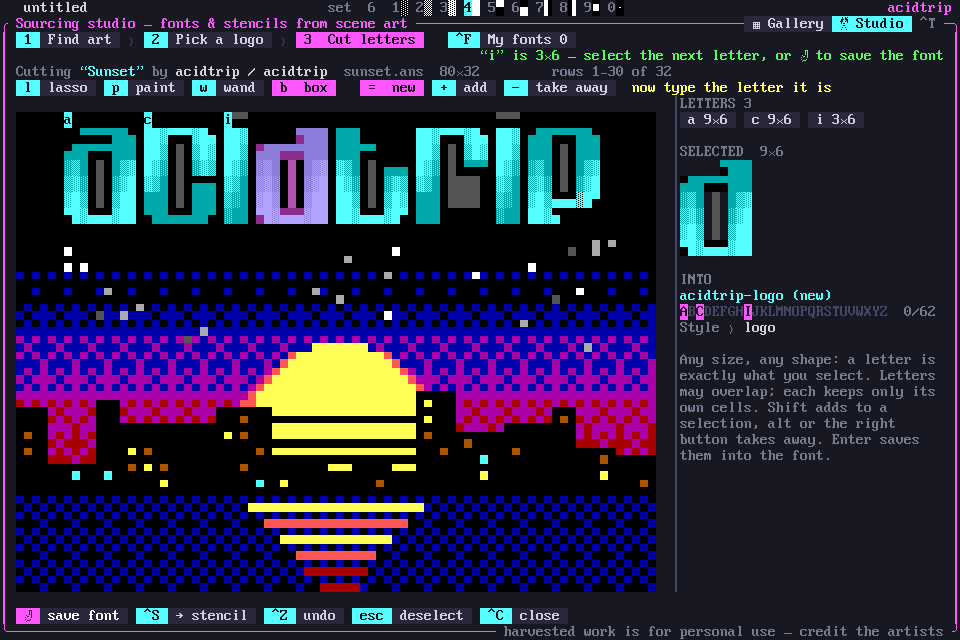
Shift adds to the selection, and Alt or the right button takes away (or pick new / add / take away on the tool row). A letter is exactly the cells you selected: any size, any shape, and letters may overlap. Click a letter’s badge or chip to reshape, rename or delete it; Ctrl-Z undoes.
Enter saves the letters into the artist’s font, and Ctrl-S saves the selection (or the logo) as a stencil. Cuts from several pieces by one artist build up one font; the Style field and chips pick which of the artist’s fonts gets them.
4. My fonts
Ctrl-F in the studio, or palette › My harvested fonts…, shows each font’s A–Z / a–z / 0–9 coverage. Green letters were cut from art and cyan ones were drawn by Claude. Click a letter to see it up close.
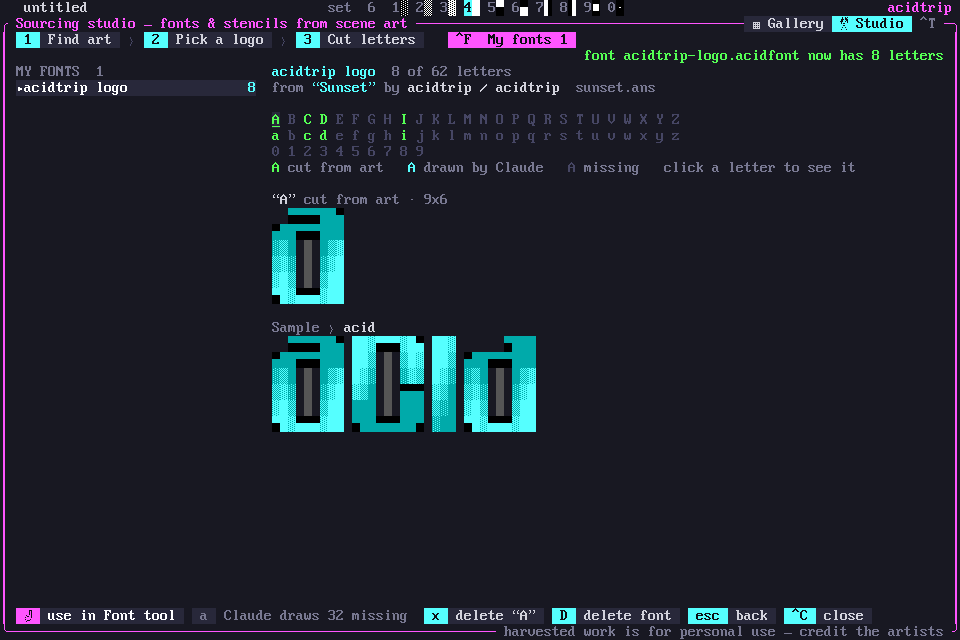
You can type a sample, delete a bad letter (and undo it), delete a font, have Claude draw the missing letters in the font’s style, or open the font in the Font tool.
Claude is optional
With an API key, Claude reads a logo’s letters to prefill the cutter, and draws missing letters. Without one, everything is done by hand. To harvest from the command line, see Fonts and stencils.
Harvested work stays in your own library, with the artist credited, for personal use.