 docs/recolor.ans · Recolor
Replace one color with another, everywhere or inside a selection.
Replace a color
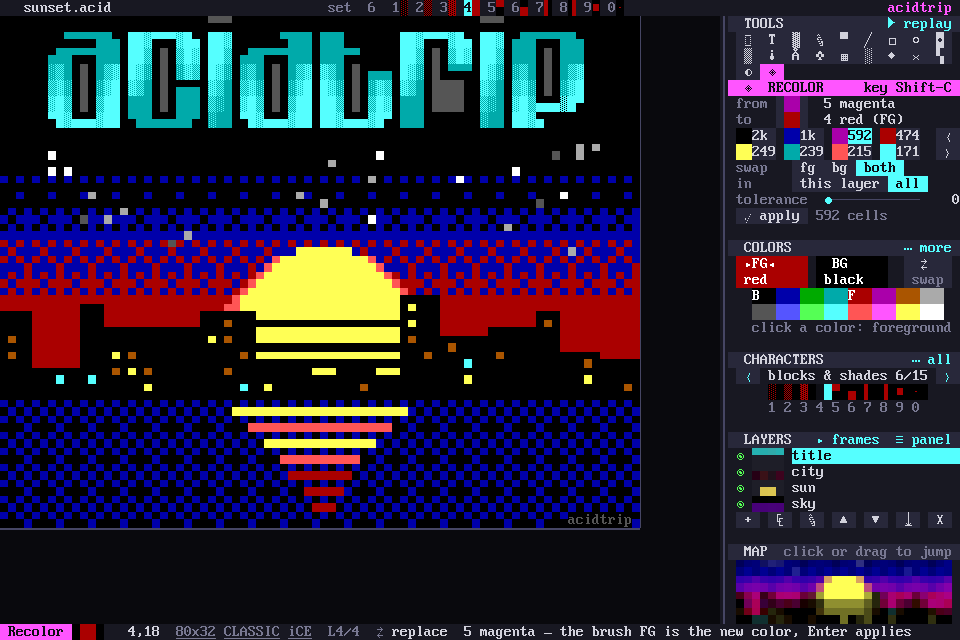
Shift-C, ◈ in the tools grid, or palette › Recolor: replace one color everywhere opens recolor.
Click a cell on the canvas to pick the color to replace, or click one of the chips that list the piece’s colors, each with how many cells use it. The new color is the brush FG.
What it touches
- Foreground, background or both.
- This layer or all layers, inside the selection when there is one.
- A tolerance slider catches similar truecolor shades.
Apply
The canvas previews it live, and apply (or Enter) is one undo step.
For a whole new look rather than one color, see Filters.