 docs/blocks.ans · Blocks and selection
Select an area, then copy, move, flip, justify, crop or reuse it, ACiDDraw style.
Selecting
V, or ⬚ in the tools grid, picks the select tool. Drag to select. Ctrl-A selects everything and Esc deselects. Delete or Backspace erases what’s selected.
The block menu
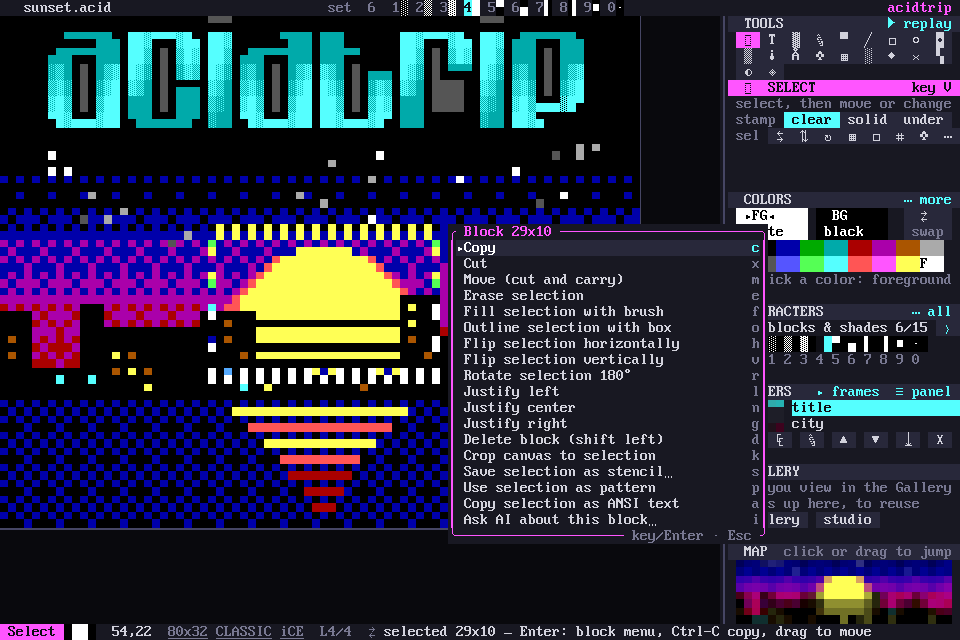
With a selection, Enter opens the ACiDDraw-style block menu (Alt-B in the acid keymap, or palette › Block menu…). Each item has its own key:
| Key | Action |
|---|---|
| C | Copy |
| X | Cut |
| M | Move: carry the block and click (or Space) to put it down. Esc leaves it where it was |
| E | Erase selection |
| F | Fill selection with brush |
| O | Outline selection with box |
| H / V | Flip horizontally / vertically, mirroring the glyphs too |
| R | Rotate 180° |
| L N G | Justify left, center, right |
| D | Delete block (shift left) |
| K | Crop |
| S | Save as a stencil |
| P | Use the selection as a pattern |
| A | Copy as ANSI |
| I | Ask AI about this block… |
Copy and paste
Ctrl-C, Ctrl-X and Ctrl-V copy, cut and paste. Pasted blocks follow the mouse and stamp on every click.
Palette › Copy selection as ANSI text puts the selection on the clipboard as ANSI, for terminals and code blocks.
Lines and columns
| Key | What it does |
|---|---|
| Alt-I / Alt-Y | insert / delete a line |
| Alt-Shift-I / Alt-Shift-Y | insert / delete a column |
They shift every unlocked layer. Locked layers stay put.
Undo
Ctrl-Z undoes and Ctrl-Y (or Ctrl-Shift-Z) redoes, with unlimited history. Every block action is one step, a move included. A move that puts the block back where it was adds no step and keeps what you can redo.