 docs/art-tool.ans · The Art tool
Turn the keyboard into a glyph board, so the left hand types blocks and the right hand moves.
The glyph board
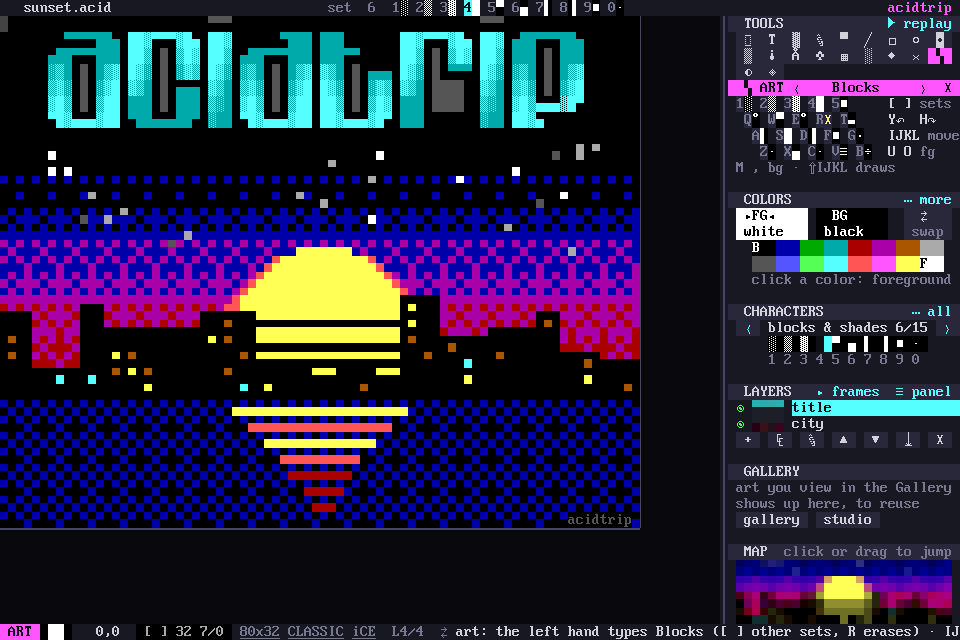
Ctrl-G, or ▚ in the tools grid, starts the Art tool. The keyboard becomes a board of glyphs: the left hand types blocks and the right hand moves. It has its own panel in the sidebar, and picking any other tool leaves it. Esc or Ctrl-G leaves too.
Spatial keys
Q W E / A S D / Z X C are the nine parts of a cell, each key’s glyph sitting where the key sits:
| Q | W ▀ | E |
| A ▌ | S █ | D ▐ |
| Z | X ▄ | C |
The corner keys hold quadrants in Modern documents. Classic documents keep to CP437, so the corners type CP437 textures instead. T G B and F V hold the details that go with the set.
1–5 are always the shades ░▒▓█■.
Glyph sets
[ ], or ‹ › on the panel, rotate the board through the sets: Blocks, Single lines, Double lines, the two Mixed line sets (╓ and ╒), and, in Modern documents, Quads and Eighths.
The sets come from counting glyphs across 500+ scene files from 1994 to 2023: the glyphs artists actually reach for, placed where your fingers expect them.
The right hand
| Key | What it does |
|---|---|
| I J K L | move; hold Shift to draw a trail |
| Y / H | undo / redo |
| U / O | cycle the foreground |
| M / , | cycle the background |
| R or Space | erase the cell |
Typing a glyph onto the same glyph erases it too.
Your own board
The panel shows the keyboard with each key’s glyph in your colors. Click a key to give it another glyph; that’s saved per set. The mouse paints with the last glyph you typed.