 docs/replay.ans · Replay
Watch a piece being drawn again, speed-paint style, and save it as a GIF or a cast.
Watch it again
Replay plays a piece being drawn again, speed-paint style. Click ► replay in the sidebar’s TOOLS header, or press Shift-R (Alt-Shift-R from anywhere).
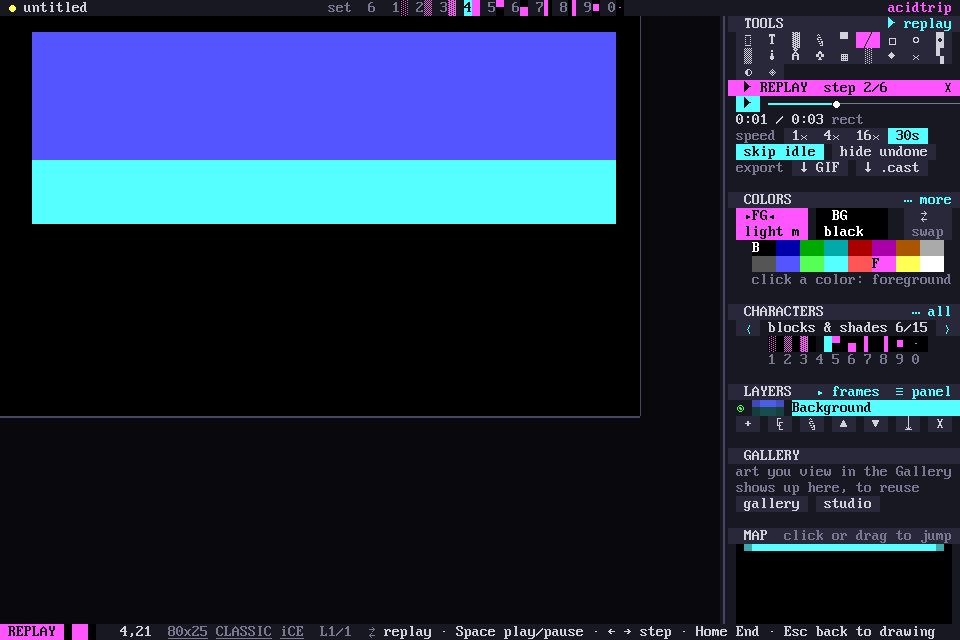
The replay panel
The replay panel takes the tool options’ place. It has play/pause, a scrubber you can click or drag, and speed chips: 1×, 4×, 16×, or 30s to fit the whole piece into half a minute.
- skip idle cuts long pauses down to a second.
- hide undone plays only the work that survived.
Keys
| Key | What it does |
|---|---|
| Space, or a click on the canvas | play / pause |
| ← → | step |
| Home / End | jump to either end |
| Esc | back to drawing |
Replay never touches the piece: leaving shows the live document again, and any edit leaves replay first.
Saving a replay
↓ GIF and ↓ .cast save the replay next to the file as an animated GIF or an asciinema recording. An untitled piece is saved first: Save as… asks where, and the replay goes next to it. From the command line:
acidtrip replay art.acid art.gif              # fit into 30 s
acidtrip replay art.acid art.cast --speed 4 --hide-undone
Where the history lives
Every edit, undo and redo is logged with its time and saved zstd-compressed inside .acid files, so the history travels with the piece. Recovery snapshots keep it too, so a piece restored after a crash still replays. Other formats and versions don’t keep it. A piece without history plays the modem reveal instead.