 docs/filters.ans · Filters
The iPhone and Instagram looks for your art, with sliders that stack on top.
Photo looks for art
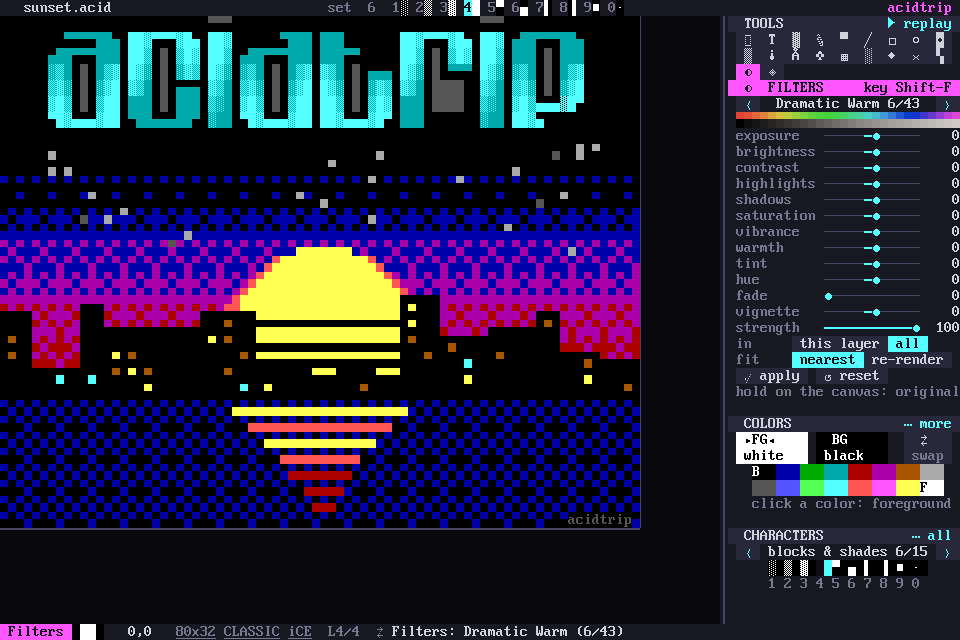
Shift-F, ◐ in the tools grid, or palette › Filters: photo looks (iPhone / Instagram) opens the filters. The panel has ‹ › to step through 43 presets:
- Original.
- The iPhone set: Vivid, Dramatic and their warm and cool versions, Mono, Silvertone, Noir, and the iOS 7 Chrome, Fade, Instant, Process, Transfer and Tonal.
- 27 classic Instagram filters, from Clarendon to Ludwig, modelled on CSSgram’s recipes.
Sliders
Under the presets are 13 sliders that stack on the preset: exposure, brightness, contrast, highlights, shadows, saturation, vibrance, warmth, tint, hue, fade, vignette and strength.
The filter works on the selection, else the layer. It changes both the glyph and the background color of every cell, and the vignette darkens toward the edges.
Preview and apply
The canvas previews the filter live. Hold the mouse down on the canvas to see the original.
apply (or Enter) is one undo step. Palette › Reset the filter (Original, sliders to 0) starts over.
Classic documents
Classic documents map the result to the nearest of their 16 colors. re-render re-fits the glyphs through the image importer instead, so blocks mix the 16 colors into smoother tones.