 docs/sharing.ans · Sharing
Copy your art as an image or text, publish a gist, or upload a PNG, from one menu.
The share menu
Alt-E (or Ctrl-Shift-E, or palette › Share…) opens the share menu.
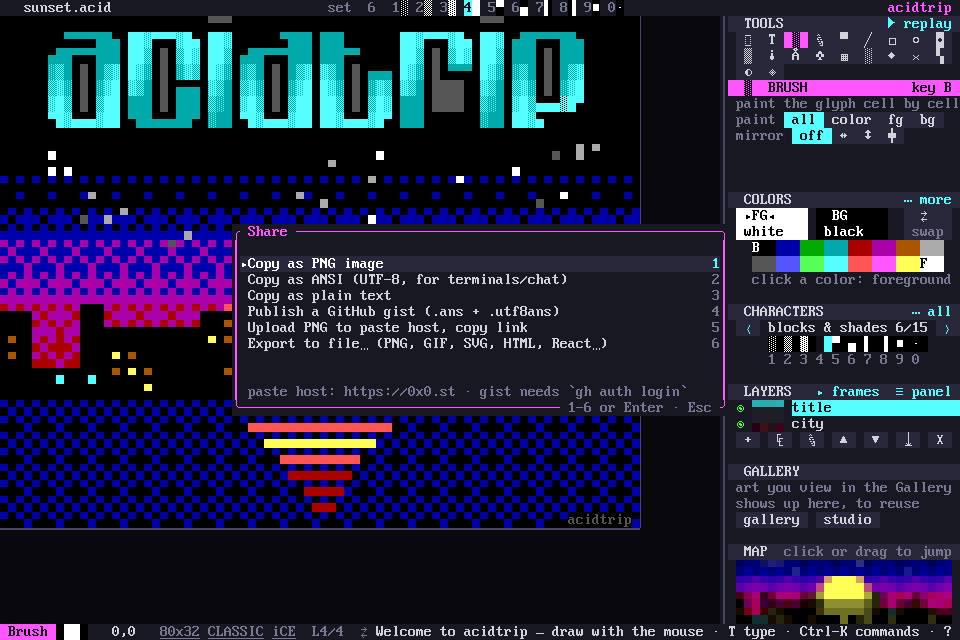
- Copy as PNG image, ready to paste into chat.
- Copy as ANSI (UTF-8), for terminals and code blocks.
- Copy as plain text.
- Publish a GitHub gist, as
.ansand.utf8ans. This needs theghcommand. - Upload the PNG to a paste host and copy the link.
- Export to file…, in any format.
Paste host and image size
The paste host and the PNG scale are set in the [share] section of the config:
[share]
paste_url = "https://0x0.st"
png_scale = 2
Other ways out
- Palette › Copy selection as ANSI text copies just the selection.
- The Export panel writes many files at once.
- Draw together shares the drawing live.